In this chapter, we demonstrate how to implement P2P (Point-to-Point) communication using Siemensfunction blocks in TIA Portal, with a focus on handling serial communication with a CHAR buffer. We’ll present two basic examples:
- Receive-Only with Buffer Reset
- Send-Only Example
Hardware Configuration
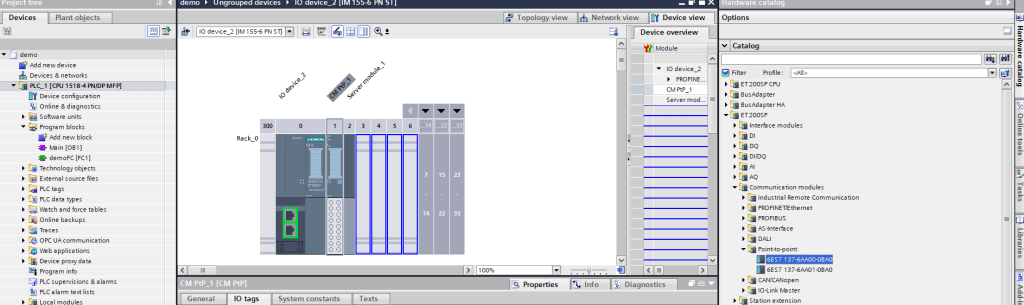
Insert CM p2p module

Modify interface settings / RS232 – 9600 – 8N1
Example 1: Receive-Only with Timeout and Buffer
Clear Goal:
- Receive data through the serial port into a CHAR buffer.
- If no new data is received for 3 seconds, clear the buffer.
- Use Receive_Reset_P2P to reset the P2P block after buffer clear
Use variables and Logic as shown in picture

Receive Logic Variables

Receive Logic
Notes
- FILL_BLK is a fast and efficient way to reset a buffer of CHAR or BYTE data.
- Use TON to detect a lack of new data (NDR = FALSE) over time.
- You can visualize receiveBuffer in the watch table or monitor it in runtime.
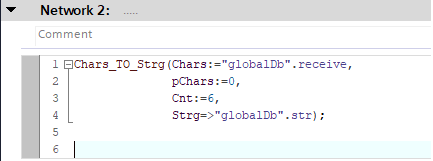
Use Chars_To_Strg to convert an array of characters to string
Example 2: Send-Only Using Send_P2P (with 1Hz trigger) Goal:
Send data via serial communication (P2P) at a fixed interval (1Hz), using a predefined array of bytes. The data length is fixed for simplicity, although in your actual application it may vary dynamically.

Variables Declariation
Logic Description
- The block Send_P2P is triggered once per second (1Hz).
- The transmission happens only if transmitEnable is TRUE.
- The REQ input of Send_P2P uses a positive edge from the 1Hz clock (using TON timer or clock bit).
- The data length is fixed (e.g., 50 bytes), but can be dynamic in your implementation.

Transmit Logic
Notes
- transmitBuffer should be filled with valid data before sending. For example, in your real project, you might build a message dynamically before each transmission.
- BUFFER_LEN is fixed here for simplicity (e.g., 50), but can be made dynamic depending on message content length.
- PortTx should match the hardware port from the device configuration in TIA Portal.
- The send trigger is periodic (1Hz), and gated with transmitEnable, using a standard contact (NO).
If you found this helpful, please consider supporting with a small donation. Thank you!
Leave a Reply