This chapter presents two real-world examples using Functions (FC) in TIA Portal to demonstrate basic logic handling and analog value scaling using SCL.
- In the first example, we use a BOOL input to set two status outputs.
- In the second example, we process an analog signal using NormX and ScaleX instructions, with additional logic for alarm thresholds.
Example 1 – Digital Input to Online/Ofline Status
Objective
Create an FC that:
- Accepts a BOOL input (e.g. a connection status).
- Outputs two BOOL signals: Online and Ofline.
- Logic
- If the input is TRUE, Online := TRUE and Ofline := FALSE.
- If the input is FALSE, Online := FALSE and Ofline := TRUE.
Block: FC_DeviceStatus
Interface
| Name | Type | Data Type |
| Connected | IN | BOOL |
| Online | OUT | BOOL |
| Offline | OUT | BOOL |
Logic (SCL or Ladder):
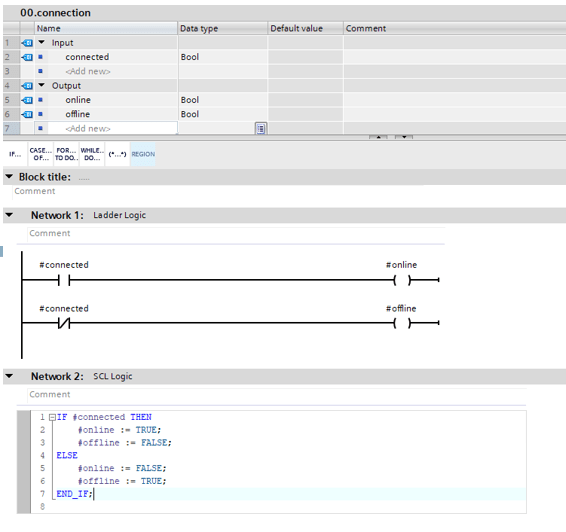
Example Implementation – Choose One Method SCL or Ladder, not Both

Call FC to OB1 (drag and Drop) – Set PLC tags from Input and Output

Input = False, Online= False, Ofline = True

Input = True, Online= True, Ofline = False
Example 2 – Analog Scaling with Alarm Levels
Objective
Create an FC that:
- Takes an INT input representing a raw analog value (e.g., from 4–20 mA input).
- Uses NormX and ScaleX to convert the raw signal into a scaled value (0–100).
- Sets:
- Alarm := TRUE if the scaled value is less than 20
- Warn := TRUE if the scaled value is between 21 and 30
Block: FC_AnalogMonitor
Interface
| Name | Type | Data Type |
| RawInput | IN | INT |
| ScaledValue | OUT | REAL |
| Alarm | OUT | BOOL |
| Warn | OUT | BOOL |
| normVal | Temp | REAL |
Logic (SCL):

Example Implementation
Summary
| FC | Purpose | Key Concepts USed |
| FC_DeviceStatus I | Basic digital logic | F, BOOL output control |
| FC_AnalogMonitor | Analog scaling + alarm thresholds | NormX, ScaleX, IF, REAL math |
These examples demonstrate the power and flexibility of using Functions (FC) with SCL to encapsulate
These examples demonstrate the power and flexibility of using Functions (FC) with SCL to encapsulate.

Status Healthy

Warn Present

Alarm Present
If you found this helpful, please consider supporting with a small donation. Thank you!
Leave a Reply