Objective
Call the FC_DeviceStatusfunction for 15 devices in a loop, using arrays stored in a data block to hold the inputs and outputs
Data Block: DB_DeviceStatusData

Prepare the Structure for 15 devices
Logic in OB1 (SCL):
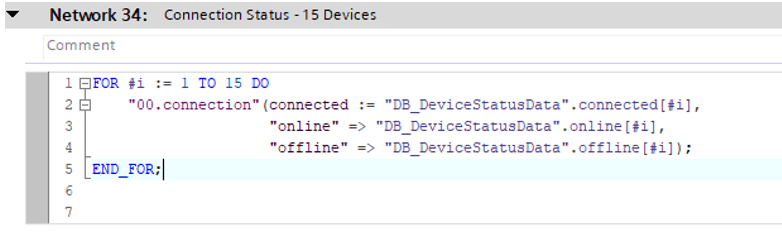
Use FOR Loop to check 15 devices
Explanation:
- Connected[i] is the BOOL input for the i-th device.
- Online[i] and Ofline[i] are the outputs of the function for the i-th device.
- The FOR loop iterates from 1 to 15, calling the function for each device in sequence.
- This way, a single function can manage multiple device statuses cleanly and efficiently.
Benefits:
- Modularity: Logic for device status is encapsulated inside the function.
- Scalability: Easily extendable by increasing the array size.
- Maintainability: Centralized function reduces code duplication.
- Readability: The FOR loop simplifiesrepetitive code.
If you found this helpful, please consider supporting with a small donation. Thank you!
Leave a Reply